Overview
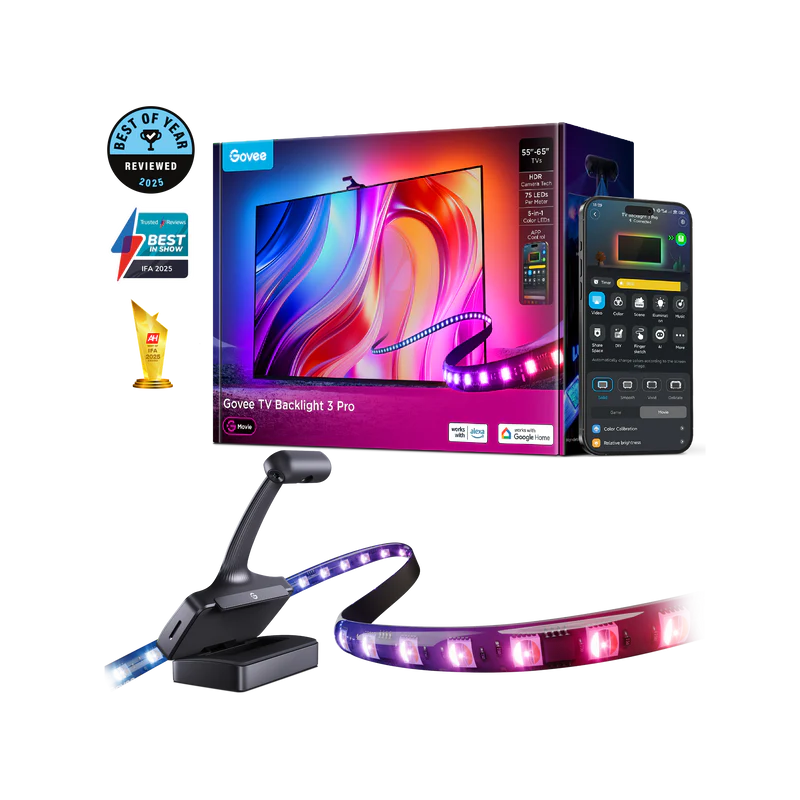
The TV Backlight 3 Pro attaches LED strips behind a television and uses a small camera mounted on top to read the screen's colors in real time. The LEDs mirror what's happening on screen to extend the color impression beyond the display edges, reducing perceived eye strain during extended viewing.
Unlike the fixed-zone versions that divide the screen into preset segments, the camera sampling makes the color matching genuinely dynamic and accurate.
Why I Recommend It
Govee's non-camera backlight versions use fixed color zones that you manually map to screen regions. That works but the colors change on a delay and the zones are coarse. The 3 Pro camera updates every frame, which means fast-moving content like sports or action sequences looks accurate rather than showing the wrong zone color at the wrong time.
Philips Hue Sync does similar camera-based screen sync but requires a Hue Bridge and Hue bulbs already in the room to extend the effect beyond the TV strip itself. The Govee version is self-contained and works without any other hardware.
Performance & Reliability
Camera sampling runs at high enough frequency that fast cuts and color shifts in content register within a frame or two. There's a small inherent delay, but it's not perceptible during normal viewing. Accuracy depends on camera placement and calibration, which takes about five minutes to get right.
The camera and control box are the components most likely to develop issues over time. The LED strips themselves are generally durable when not bent at sharp angles. Adhesive quality on cheap TV backs sometimes fails in hot rooms.
Govee's app handles scene and sync configuration. Without the app or cloud connectivity, the camera sync mode doesn't function. Manual static colors continue to work through local control.
Setup & Installation
Attach the LED strips to the back of the TV, mount the camera above the screen pointing at it, plug in the control box, and run the camera calibration in the Govee app. Calibration involves selecting the TV corners in the camera feed. The full process takes fifteen to twenty minutes.
Value for the Money
Camera-based bias lighting from Philips Hue costs two to three times more for comparable coverage when you factor in the bridge and compatible bulbs. The Govee 3 Pro delivers the core feature at a fraction of that cost.
If you watch a lot of content in the dark and currently use no bias lighting at all, this makes a visible difference in comfort. It's not a gimmick. Bias lighting that tracks screen color genuinely reduces the contrast fatigue of watching a bright screen in a dark room.
Technical Specs
Connectivity
Wi-Fi, BLE, Matter
Protocols
Use Case
Homes that want smart lighting with app control, effects, and voice assistant support.
Best for